
News
A Mac blog tested Unclutr Files — here’s what they found
Last updated: March 5th, 2026
Recently, the Mac-focused blog VVMac wrote about Unclutr Files, our exact duplicate file cleaner for macOS. This post summarizes what they highlighted and how that lines up with the design choices behind the app.
You can read the original article here:
It is always interesting to see how someone else explains your product, especially when they discover it independently. In their article, the author walks through how Unclutr Files works and why it takes a different approach compared to many traditional duplicate cleaners.
A different approach to duplicate file cleaning
Many duplicate file cleaners try to detect files that are similar. That often leaves the user with a difficult decision:
Are these files really duplicates, or just similar?
As the article points out, Unclutr avoids this problem entirely. Instead of estimating similarity, it detects true duplicates only by comparing the actual file contents.
“Unclutr ne repère que les fichiers qui sont réellement identiques, octet par octet.”
— VVMac
In practice, this means the application only identifies files that are byte-for-byte identical using file hashing. If a file appears in the results, there is no ambiguity — the files are exactly the same.
That single design choice removes a lot of the uncertainty found in other tools.
Privacy-first and fully local
Another aspect the article highlights is that everything runs locally. Duplicate detection is performed directly on the user’s Mac. No files are uploaded and no tracking takes place.
The application is also:
- sandboxed
- notarized by Apple
- available on the Mac App Store
This lets Unclutr Files follow Apple’s security model while still allowing users to scan folders, drives, and external volumes.
A simple scanning workflow
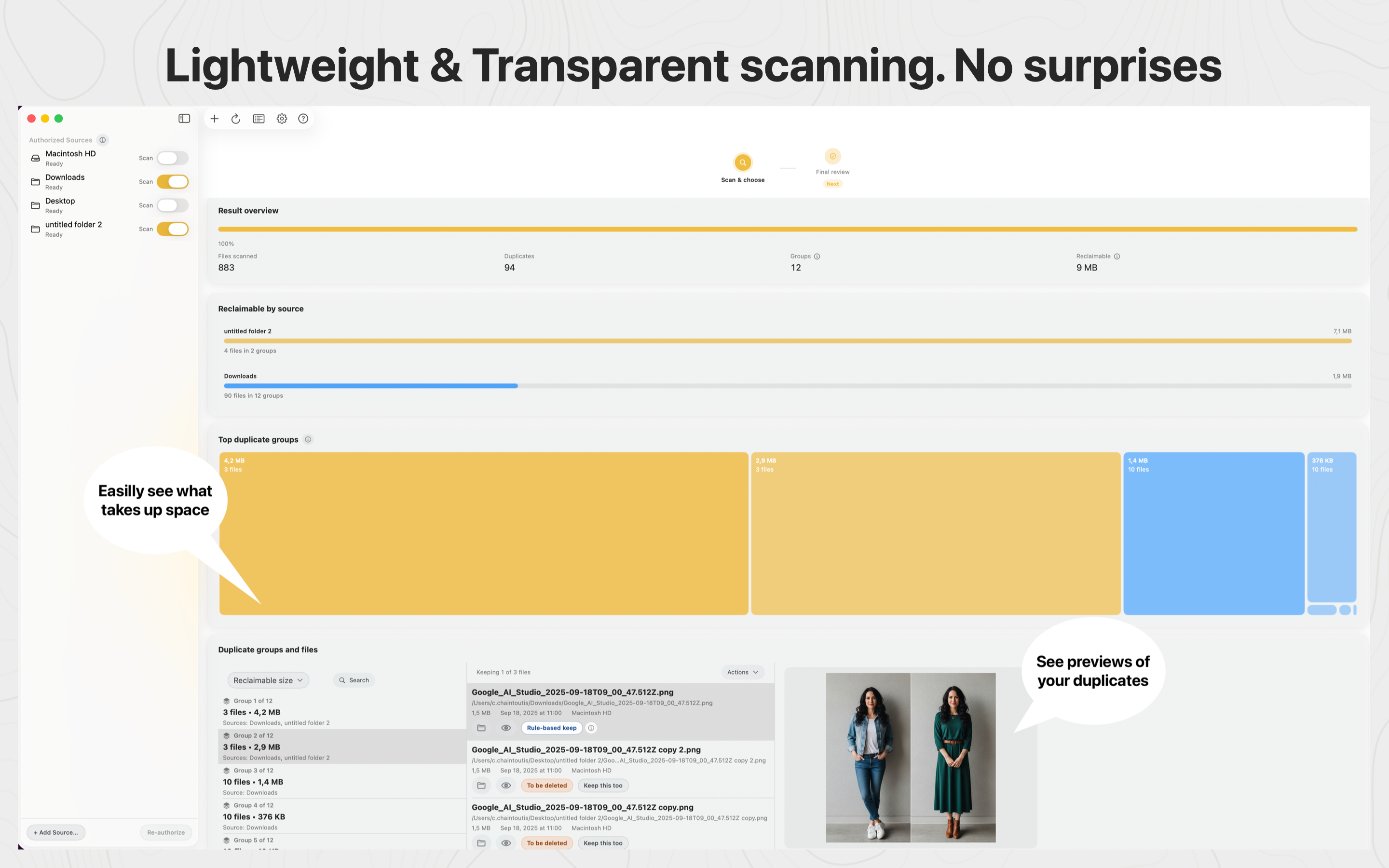
The VVMac article walks through the typical workflow in Unclutr Files:
- Select one or more folders or disks to scan.
- Let the app analyze files.
- Review the duplicate groups found.
- Move unwanted copies to the Trash.
One safety feature the author calls out is that files are never permanently deleted automatically. Instead, selected duplicates are moved to the macOS Trash, which makes it easy to restore them if needed.
Real feedback from readers
The comment section under the article also surfaced useful questions and feedback. For example, some readers wondered whether files needed to have the same name to be detected as duplicates.
They do not. Unclutr Files compares the actual file content, so files with completely different names will still be detected if their contents are identical.
Other comments pointed out areas where the workflow could be clearer — especially around the final deletion step. Feedback like this is extremely valuable when iterating on the app.
What’s coming next in Unclutr Files
Several improvements are already on the way. The upcoming version 1.3 focuses on:
- refinements to the cleanup workflow
- UI improvements that make actions and outcomes clearer
- support for cleaning duplicate folders
- the start of French localization
Given that many VVMac readers are French-speaking, the translation work should make the app much easier to use.
Try Unclutr Files
If you’d like to try the app yourself, you can download it here:
You can also install Unclutr Files directly from the Mac App Store. The app is currently free and works on macOS 13.5 or later.
Thanks to VVMac
Finally, a big thank you to Bernard Le Du and the VVMac blog for taking the time to test and write about Unclutr Files. Independent coverage from the Mac community is incredibly valuable for small indie projects like this.
You can read the original article here:
